Another Approach
The previous steps involved navigating by subject category to a general-subject database. You can also use the Quick Search box to find articles in several databases with one keyword search.
GALILEO Quick Search is a federated search engine that allows you to search multiple databases simultaneously. Comprehensive results are displayed in an easy-to-navigate list.

A basic search can be executed from the Quick Search box on the GALILEO home page.
- Enter a search term.
- Leave the subject category default to “General Topics” or click the down arrow to choose another category.
- Click the Search button.
Results Page

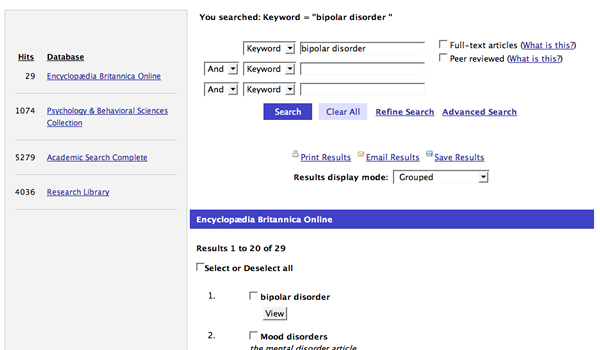
- List of results by resource
- View databases that have returned results and number of hits.
- Order of resources is determined by the speed with which they return results, so the list may vary with each search.
- List of results
- By default, results are grouped by database. To list results by date, relevancy, or other ranking, use the “Results display” pull-down menu
- Click “View” to see the article or abstract. (Some databases also use “HTML FullText,” “PDF Full Text,” or other wording.)
- Search Again
- Edit search term to retrieve new set of results.
- Select a new category to search a different set of databases.
- Check the “Full-text articles” box to retrieve more full-text articles. Results will still contain abstracts and citations that do not link to full text.
- Click on “Find Related Terms” for suggested alternate search terms.
- Click on “Advanced Search” for more search options.
END OF GALILEO navigation section