The Interface Design
How GALILEO screens are organized
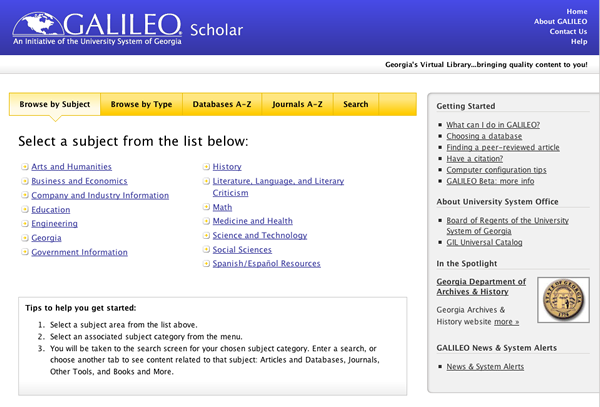
Every GALILEO screen has the same basic organization. It's split into three sections:

- The GALILEO menu
- The databases subject categories and alphabetical database list
- The work area
The GALILEO Menu
The GALILEO menu appears in the upper right hand corner of the screen.
-
Home: Takes you back to the GALILEO Homepage.
-
About GALILEO: Takes you to general information about GALILEO, including links to information for general and specific GALILEO users.
-
Policies: Takes you to a page that describes policies relating to GALILEO.
-
Contact Us: Takes you to a form for sending a comment to GALILEO about the databases and provides a link to 'Frequently Asked Questions' that may provide immediate help.
-
Help: Takes you to the help index for GALILEO. 'GALILEO Help' gives you general guidelines for searching. For help with a particular database, click on the help icon within that database.
-
Kids: Takes you to several database options appropriate for younger kids.
-
Database List: Takes you back to the list of databases in the category or subcategory you last selected.
-
Ask-a-librarian: Takes you to a form you can use to submit a question about finding information on a topic. This link only shows when the user’s home library has an Ask-a-librarian program.
These items are usually available in their spot across the top of the screen — even when you're accessing a database.
The subject categories and alphabetical database list
The subject categories and alphabetical database list appear near the top of the screen. Click on the category you want and the results are displayed in the work area of the screen. Your results are a list of subcategories with databases that contain material relevant to that category. When you enter a database, this list disappears to provide a wider screen area in which the database will appear. This list is always accessible by clicking on 'Home' on the GALILEO menu.
The work area
The work area is the part of the screen that changes. When you select a category, the list of subcategories with databases available through that category will appear in this part of the screen. When you select a database, the database's search screen will appear in this part of the screen.